How to fix stuttering in movies with a 30-second TV settings adjustment
Experts explained why modern televisions often exhibit stuttering during movie playback and how a hidden setting can resolve the issue instantly.
 💡Tech
Photo: UNIAN
Key points
- Stuttering stems from a mismatch between 24 fps and screen Hz
- Enabling match content frame rate solves the problem
- Filmmaker mode removes artificial motion smoothing
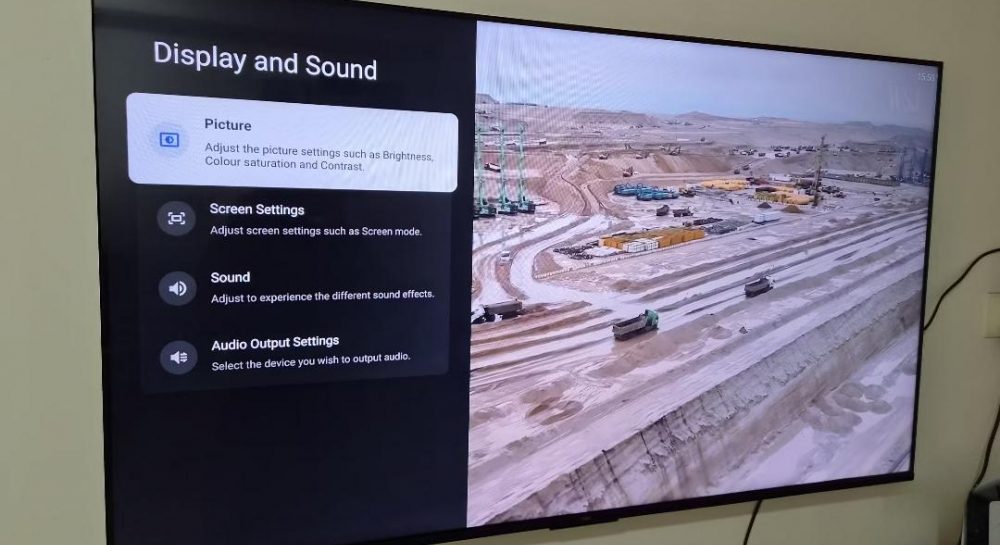
Many owners of modern televisions frequently encounter unpleasant video stuttering and micro-freezes while watching movies or TV series. Often, users mistakenly blame unstable internet connections or streaming app glitches for the problem, while the real root cause lies in technical display parameters.
The Main Cause of Video Stuttering
According to tech reviewers, the overwhelming majority of films and shows are shot at 24 frames per second, whereas modern displays operate at 60 Hz or 120 Hz refresh rates. To bridge the gap between 24 fps and a 60 Hz screen, televisions employ conversion techniques that create an uneven rhythm, which becomes particularly noticeable during panning shots and horizontal object movement.
To get rid of these annoying jerks, users only need to spend a few seconds tweaking the device's settings. Specifically, experts recommend enabling the match content frame rate option, which manufacturers often leave disabled by default. Turning this on allows the TV to stop artificially stretching the video and automatically adjust its refresh rate to match the source material.
Handy Tips for Better Viewing
- Enable the match content frame rate feature in your settings.
- Choose between seamless and non-seamless switching modes depending on your TV model.
- Turn on the Filmmaker mode to disable aggressive motion smoothing that alters the director's vision.
Such straightforward menu adjustments will let you enjoy your favorite cinematic pieces without irritating judder and exactly in the quality intended by the creators.
Source UNIAN — unian.ua/techno/gadgets/chomu-smikayetsya-zobrazhennya-na-televizor… ↗
Read next
 🇺🇦Ukraine
Belgium to Close Airspace Completely Due to Nationwide Air Traffic Controllers' Strike
All flights in Belgium will be grounded on Monday as air traffic controllers join a nationwide protest against austerity.
 👥Society
How to Restore Softness to Terry Towels: A Proven Method for Konotop Households
A simple two-step washing technique using common salt and citric acid can effectively revive stiff towels and remove mineral buildup.
 🧠AI Analysis
The Philosophy of Repair: Why the Next Stage of Development Requires Re-evaluating Everyday Infrastructure Labor
An analysis of the repair concept in current conditions shows that society must shift from grand plans to regular maintenance of damaged systems.
 🧠AI Analysis
Parliamentary Oversight vs NABU Independence: Expert Weighs In on Semyon Kryvonos Situation
Political expert Volodymyr Sonyuk stated that NABU Director Semyon Kryvonos must appear before a parliamentary Temporary Inquiry Commission following resonant testimonies…
 💼Economy
Elina Svitolina and Marta Kostyuk Nominated for Prestigious WTA Year-End Awards
Leading Ukrainian tennis players Elina Svitolina and Marta Kostyuk have been shortlisted for the Women's Tennis Association annual awards.
 💼Economy
Enemy Attacks on Energy Grid: Zhytomyr Region Hit Four Times in a Day
Russian forces carried out four drone strikes against energy facilities in the Zhytomyr region within 24 hours. Despite the damage, repair crews are working to ensure a s…